
Sip2
SIP2 (Standard Interchange Protocol v2) is a widely adopted communication protocol used by library systems (ILS) to handle transactions like patron authentication, checkouts, and check-ins. The ePRINTit SaaS platform supports SIP2 as an external Identity Provider (IdP) to authenticate library users using their library card barcode and PIN.
This document outlines the required fields and configuration steps for integrating a SIP2 Identity Provider in the ePRINTit SaaS portal.
Using SIP2 as an Identity Provider allows ePRINTit to:
Authenticate patrons against a library’s ILS system.
Provide secure and controlled access to print and kiosk services.
Integrate seamlessly with existing library infrastructure without duplicating user databases.
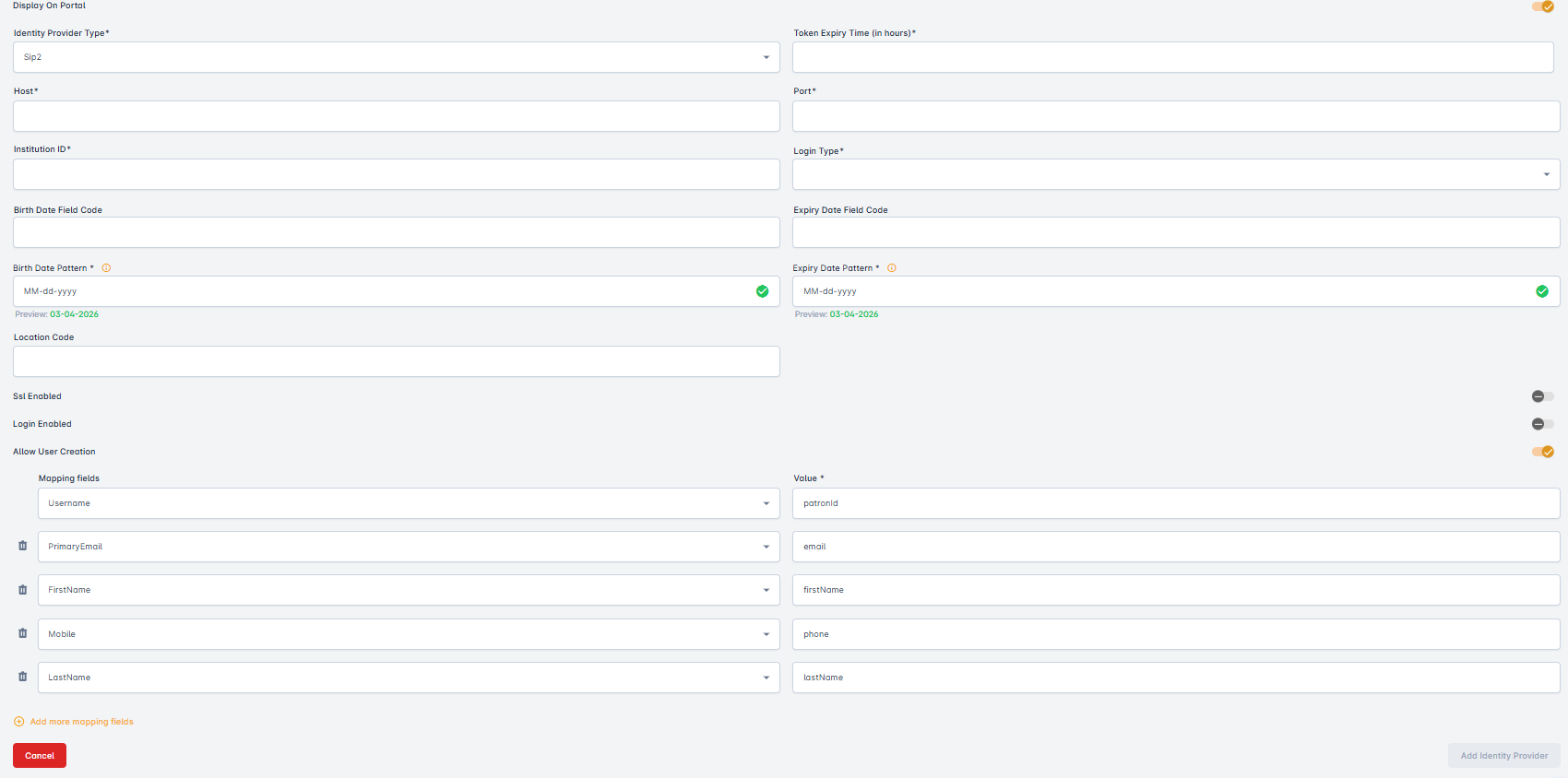
Display on Portal
Controls whether the identity provider is shown as a login option on the user-facing login portal.
Identity Provider Type
Refers to the category or specification of an identity provider used for authentication and authorization services and user access management. From this dropdown, select the Sip2 Identity Provider.
Token Expiry Time(in hours)
Refers to the period during which a security token, such as an access token or session token, remains valid for authentication or authorization purposes. Enter the Token Expiry Time here in hours.
Host
IP address or hostname of the SIP2 server (provided by the library’s ILS).
Port
TCP port used by the SIP2 server.
Institution ID
The institution or library ID used in SIP2 messages (AO field).
Location Code
Specific location or branch code, if applicable.
Login Type
Suggests the use of an advanced or cutting-edge identity provider for authentication and authorization, likely employing modern techniques and technologies for user access management. The specific methods and features can vary widely depending on the provider and its innovative approaches to identity and security. From this dropdown, select the LoginType Identity Provider. There are two options:
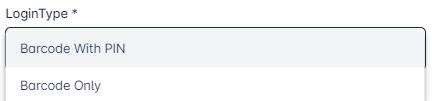
Barcode with PIN
Refers to a security or authentication method where a barcode (such as a QR code) and a personal identification number (PIN) are used in combination for user verification and access control. This dual-factor authentication approach enhances security by requiring both something the user knows (the PIN) and something the user has (the barcode) for authentication.
Barcode Only
Refers to a method of authentication or identification that relies solely on a barcode, such as a QR code, to verify and provide access to a system, service, or information. It does not involve the use of additional factors like a PIN or password.
Birth Date Field Code
This field defines which code will be used to extract the birth date from SIP2 response, since the parsed response currently does not expose birth date as first-class field.
Birth Date Pattern
This field defines the format in which a user’s birth date must be entered or displayed in the system to be used in Easybooking group.
The pattern specifies the order and structure of day, month, and year (for example: DD/MM/YYYY or MM-DD-YYYY).
Using the correct pattern ensures that the birth date is recognized, validated, and processed correctly by the system.
Expiry Date Field Code
This field defines which code will be used to extract the expiry date from SIP2 response since the parsed response currently does not expose expiry date as first-class field.
Expiry Date Pattern
This field defines the format in which an expiry date must be entered or displayed. It specifies the order and structure of the date elements (day, month, year) so the system can correctly interpret and validate the expiry date, in Easybooking group.
Examples:
MM/YY→ Month and year (e.g.,08/26)MM/YYYY→ Month and full year (e.g.,08/2026)DD/MM/YYYY→ Day, month, and year (e.g.,15/08/2026)
SSL Enabled
Enables SSL encryption. Use if SIP2 server supports secure communication (e.g., via stunnel).
Login Enabled
Enables sending a SIP2 login (01) message before sending patron requests.
Username
Represents the SIP2 terminal login.
Password
Password for the SIP2 terminal.
Mapping field
Refers to a data field that links or associates data from one source to a corresponding field in another source. Here are multiple dropdowns. From these dropdowns, select the mapping variables.