
World Key Pin
The World Key PIN (WKP) Identity Provider allows users to sign in using a World Key ID and a personal PIN. This method is commonly used on kiosks and printing devices where a quick and simple login is needed.
With WKP authentication, users can:
Access their personal account using a PIN code
Retrieve and manage their print jobs
Use services without needing a username, email, or corporate login
This sign-in option is ideal for environments where users prefer a fast, badge-free login experience or where traditional login methods are not available.
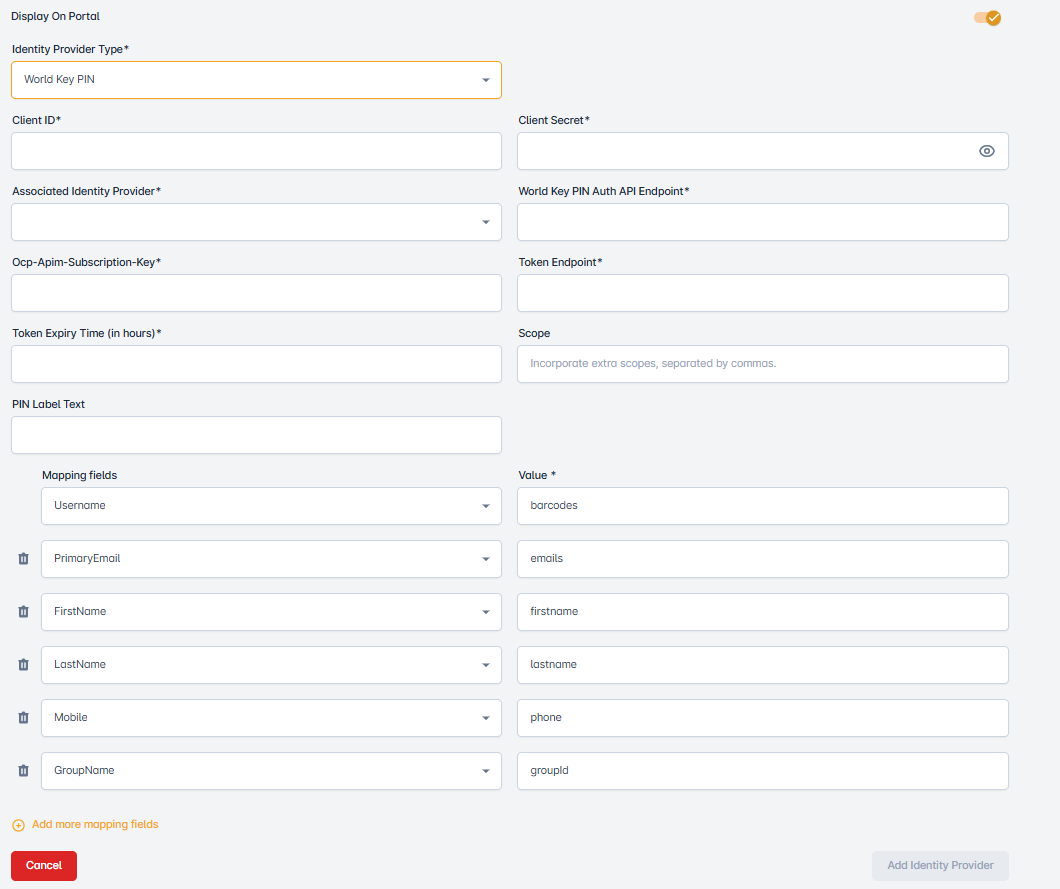
Display on Portal
Controls whether the identity provider is shown as a login option on the user-facing login portal.
Identity Provider Type
Refers to the category or specification of an identity provider used for authentication and authorization services, often in the context of user access management. From this dropdown, select the World Key Pin Identity Provider.
Client ID
Is a unique identifier used to distinguish and recognize a specific client, typically in the context of business, services, or applications. Enter the Client ID for the World Key Pin Identity Provider here.
Client Secret
Is a confidential and securely stored piece of information used for authentication and authorization purposes, often in the context of API access or client-server interactions. Enter the client secret for the World Key Pin Identity Provider.
Associated Identity Provider
World Key PIN Auth API EndPoint
Ocp-Apim-Subscription-Key
Token Endpoint
Token Expiry Time(in hours)
Refers to the period during which a security token, such as an access token or session token, remains valid for authentication or authorization purposes. Enter the Token Expiry Time here in hours.
Scope
The scopes field is used to specify any extra OAuth 2.0 scopes that should be requested during the authentication process. Scope define the level of access and types of user information the identity provider should return.
These scopes are sent as part of the authentication request and help the identity provider determine which user attributes or permissions should be included in the token.
Password Label Text
User can add custom Password Label Text.
Mapping field
Is a term commonly used in data integration and transformation. It typically refers to a data field that links or associates data from one source to a corresponding field in another source. Here are multiple dropdowns. From these dropdowns, select the mapping variables.
Value
The data within a mapping field that connects or associates data from one source with its counterpart in another source, facilitating data integration and transformation. Here are multiple dropdowns. From these dropdowns, select the mapping values.