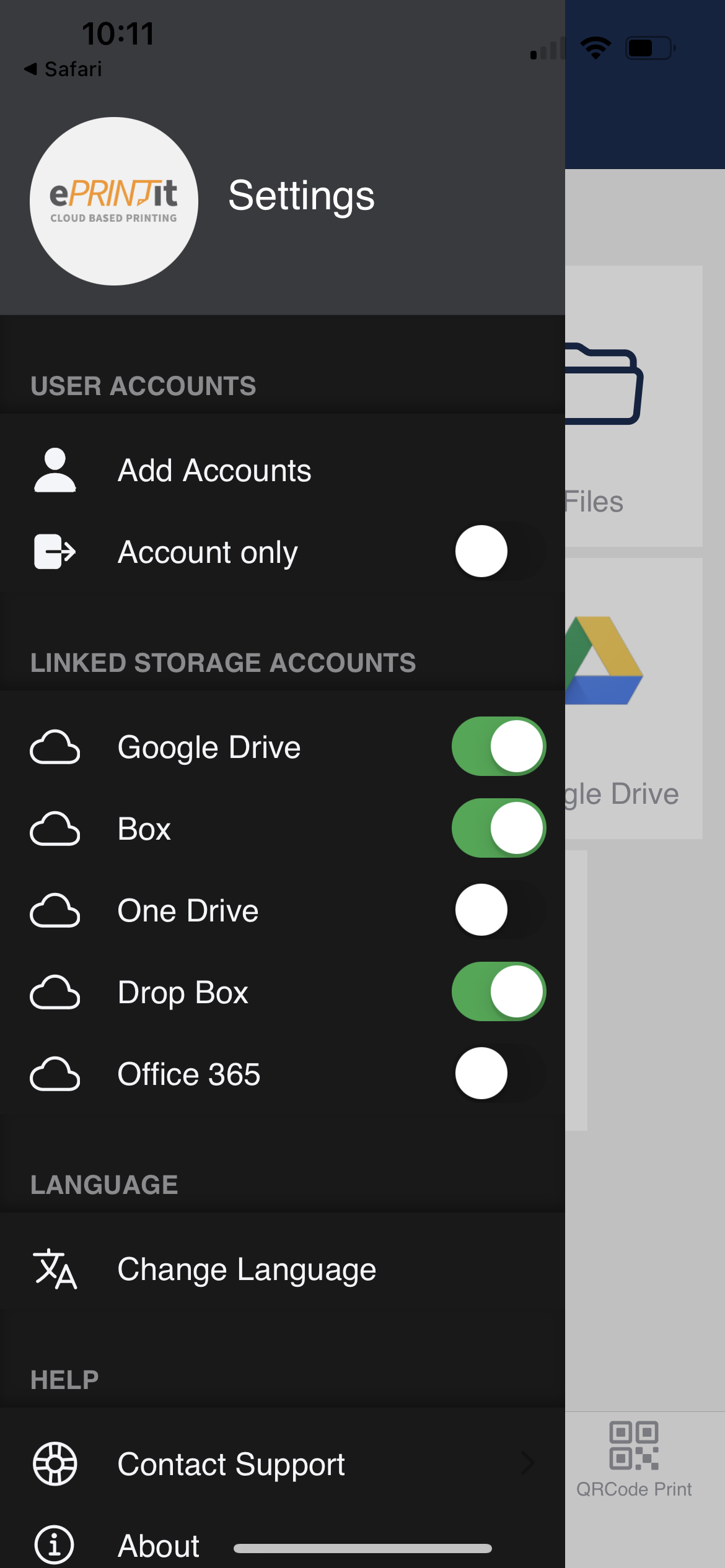
Linked Storage Accounts
Within the Settings, there is a section dedicated to display the Linked Storage Accounts. This section allows users to link and manage their cloud storage accounts for document storage and retrieval.
Linked Storage Accounts (Enabled)
When a user successfully links a cloud storage account (e.g., Google Drive, Dropbox, OneDrive), that account is displayed in the Linked Storage Accounts section with a toggle switch enabled.
When the toggle switch is enabled, it indicates that the storage account is linked and ready to use for document storage without requiring additional login credentials.
Users can perform actions related to linked accounts, such as selecting them as default storage locations for saved documents or configuring upload/download settings.
Unlinked Storage Accounts (Disabled - Requires Login in the Storage Account)
If a user has not linked a particular cloud storage account, it is displayed in the Linked Storage Accounts section with the toggle switch disabled.
The disabled toggle switch signifies that the storage account is not linked. To use this storage account, the user must click on it, which prompts them to provide login credentials (e.g., username and password) or undergo an authentication process with the storage provider.
Users can tap on the disabled storage account to initiate the login process or to link their account to the ePRINTit SaaS application.
This user-friendly approach ensures that users can easily manage their linked and unlinked storage accounts for document storage while providing a clear indication of whether login credentials are required to access each account. It simplifies the process of integrating cloud storage with ePRINTit SaaS for document management and printing.